
Guest link
Everything the guest needs, in one link.
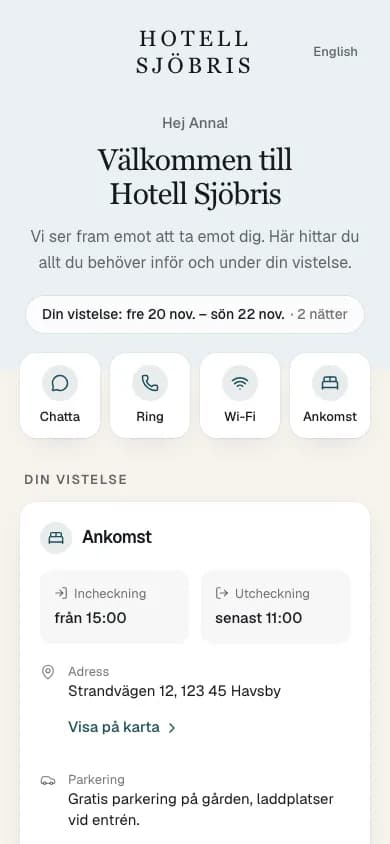
The booking, the Wi-Fi code, a chat with the hotel and your own offer, on one page in the guest's phone.
How it works
Send it, print it, switch it on.
- 01
Send it.
Reception sends the guest link from VLine with one tap, and the guest gets it by SMS.
- 02
Print it.
Put the QR code up in the rooms and at reception.
- 03
Switch it on.
You switch the guest link on yourselves in VLine and choose what it shows.
On the page
What the guest looks for, in one place.
The booking
The guest sees their dates, when check-in opens, the address and where to park.
Wi-Fi
The network and the password are on the page, and the guest copies the code with one tap.
Chat
The guest writes to you straight from the page, and the conversation lands in Messages in VLine.
Your own extra
One extra you choose yourselves, such as breakfast, the spa or a late check-out, and you charge for it at reception.